June 5th, 2026
Product Update: New Models, Voice Features, Canvas & More Ways to Work with amberAI
Hello everyone! This update brings a fresh set of improvements to amberAI: new AI models, voice input and output, richer answer formats, stronger agent capabilities, and the new Canvas mode. In short: more flexibility for data visualization, better workflows, and a smoother experience across chat, agents, and everyday work.
New AI Models
amberAI now supports additional state-of-the-art models: GPT-5.5 and Claude Opus 4.8. This gives users even more flexibility to choose the right model for their task — from complex reasoning to fast drafting and multilingual work.

Voice Input and Output
You can now interact with amberAI using voice:
Speech-to-Text makes chatting faster and more natural, while Text-to-Speech can read AI messages aloud. Text-to-Speech is powered by ElevenLabs and is disabled by default — admins can enable it for their organization.

New amberAI Output Capabilities
amberAI can now create richer outputs directly in chat. For example, teams can generate diagrams and graphs to visualize for example customer onboarding flows or support ticket trends.
They can also create interactive interfaces inside the chat, for example to showcase simple ROI calculators, pricing scenario tools or implementation checklists.


Canvas
Canvas is now generally available, making it easier to draft, edit and structure a document directly inside amber with the help of amberAI. Use it for documentation, drafts, planning, and any other work.

Agent Updates
Agents are becoming more flexible and easier to configure. They now support MCP actions. Add selected MCPs to the agent and allow the agent to directly carry out actions in your preferred systems.
Sharing agents is now more collaborative: users can allow others to edit their agent and invite others. This makes working together with agents smoother.
Moreover agents can access the Canvas, instructions can now be written and uploaded in Markdown. We also added support for more file types, so agents can work with a broader range of inputs.

Dark Mode
amberAI now includes Dark Mode and updated theming options. Statuses also have a refreshed look, making the interface clearer and more comfortable to use across different working environments.

Chat Completion Notifications
You can now get notified when amberAI finishes a longer response. Notifications are available inside amber and at OS level, so you can keep working elsewhere and come back when the answer is ready.

General Improvements
We also added several quality-of-life improvements: better suggested prompts, improvements to the Outlook Add-in, and the option for admins to set up company-specific prompt examples. Moreover, you can now directly add images from amberSearch to the chat. This also works directly from the integrated document search in amberAI.
These updates help users get started faster and make amber feel more tailored to each organization.
That's it for now. We have a whole host of other features in the works. Stay tuned!
The amber Team
April 20th, 2026

Hello everyone! Spring brings fresh energy and with it a whole range of new features you've been asking for. From now on, you can search for documents directly in the chat or have amber automatically generate documents for you. Search faster, click less, get more done. Give it a try – and as always, we look forward to your feedback!
Create Files with amberAI (Word, Excel, PowerPoint and more)

With amberAI, you can now easily have documents created directly in your working context – whether it's an initial idea, a summary, or a finished draft. Just briefly describe what you need, and amberAI will generate a suitable document (e.g. Word, Excel, PowerPoint and more) that you can immediately reuse or share with your team.
Agent Library Update

We have completely revamped the Agent Library: In addition to your personal library (formerly "Favorites"), there is now a Marketplace where all agents shared with you are centrally available. Frequently used agents can easily be added to your library for quicker access. You'll also find your recently used agents directly in the sidebar – and you can pin your favorites there for quick access at any time.
Search Documents Directly in Chat and Chat About Them

With the new document search, you can now use indexed files from amberSearch directly in the chat. Using the "/" operator or with a click, you can easily add relevant documents such as PDFs or Excel files to the chat and ask questions about them directly. amberAI seamlessly accesses this content and supports you with all available skills. Particularly handy:you can open the files side by side while working in the chat – for a consistently smooth workflow without any context switching.
amber Outlook Add-in

With the new amber Outlook Add-in, you bring the full power of amber directly into your inbox. Use all the features of amberSearch and amberAI within Outlook and save time in your daily communication:have emails including attachments summarized, generate suitable replies in seconds, and easily adjust tone, length, and content. Professional emails are created in no time – perfectly tailored to your context.
More information about the Outlook Add-in here:
MCP Integration (Beta)

We are also launching MCPs in Beta: at launch, there are already pre-built MCPs available for Outlook and Slack. This means amberAI can not only provide information but also directly execute actions – for example, you can simply tell amberAI to send an email, and the action is carried out immediately. For developers, it gets even more flexible:they can connect their own custom MCPs and extend amberAI with actions in third-party systems. Admins retain full control, can manage MCPs centrally, and can additionally provide their own custom MCPs to their user base.
Pin Chats and Share with Colleagues

You can now pin important chats so they always stay at the top of your history in the sidebar. Plus:with a simple link, you can share a chat directly with colleagues – they can not only view the conversation history but even seamlessly continue it. Of course, the same rules still apply:all content respects existing access permissions – no one sees documents or information they are not authorized to access.
March 6th, 2026

Hello everyone!
In February, we’re updating amber with a fresh design and many new features that will noticeably make your workday easier. Clearer, faster, more helpful - let’s go!
Launch of the new amber design!

With the new design, your workflow gets a fresh, clean home! The new sidebar guides you more quickly to all the key functions like search, chat, agents, and your history. With the new tab bar navigation, you can send the same request directly from a search to a chat - and vice versa! We’ve also simplified the chat settings and much more. Just give the new design a try!
Generated Tables in Chat
If you often have amber generate tables in the chat, we’ve got good news! You can now view them
in full-screen
and download them directly as
.csvor.xlsxfiles
to continue working with them.
New Abilities for Agents

We’re equipping agents with additional capabilities to integrate them more deeply into your workflow. To do this, we’ve expanded the agent editing page.
Deep Research
Put your agent into Deep Research mode and choose specific web or data sources to better answer targeted queries.
Best Model
Does your agent handle a wide range of requests? Choose the “Best Model” option to dynamically select the AI model based on the user request.
Image Generation
Do you need graphics for certain information? Have your agent generate images for you directly.
More possibilites through agent instructions
With the update, we’re expanding agents’ ability to follow step-by-step instructions. Agents can now perform web and internal searches in an order you specify. Try it out by defining fixed steps in your agent’s instruction!
New Default AI Models
To ensure higher answer quality, we’ve updated our default models. For users of GPT models, GPT‑5 is now the default model. For Llama users, Qwen 3‑next will be the default model. These models can handle complex information better and will therefore answer your requests even more effectively.
Deep Research Update
So you can work directly with the generated Deep Research reports, you can now download these reports directly as Word documents!
That’s it for our February updates. Stay tuned for the coming months. We have many new features in development for your everyday work!
Your amber team
January 22nd, 2026
🔬New feature: the Deep Research mode

The Deep Research mode helps you answer complex questions more thoroughly and reliably. It analyzes content in depth, compares multiple information sources, and delivers consolidated, well-founded results in clear language. This saves you manual research, reduces tool switching, and provides a significantly higher result quality. Connections are presented in an easy-to-understand way, so even extensive topics are easy to follow. This saves time in day-to-day work, increases the accuracy of your decisions, and reduces follow-up questions because key points are explained transparently right away. The results created can also be conveniently exported as a standalone document with a single click.
In Deep Research mode, the system conducts a significantly more comprehensive investigation than with a normal request. Instead of generating just a single answer, multiple independent analyses are created in parallel. These partial results are then consolidated, cross-checked, and quality-assured. This reveals contradictions, fills in missing points, and clearly highlights the most important insights. In addition, the mode searches relevant content and documented sources, evaluates their reliability, and purposefully incorporates them into the answer.
Please note: creating these reports will take several minutes due to their complexity.
Example:

🤖New feature: memory function of language models

amber can, going forward, deliberately remember information on your instruction and automatically take it into account in later questions. This means you don’t have to provide important details multiple times and you’ll receive more context-aware answers. For example, you can say: “Keep in mind that the approval processes for marketing budgets are handled by John Doe,” and amber will use this information in future conversations. The memory feature can be managed transparently: you can view, update, or delete stored entries, keeping full control over your conversation context.
Example:


⚙️New feature: Advanced user options with memory overview and easy management
With the new options, you get a clear overview of your saved content in the Memory feature. All relevant information is centrally visible, so you can quickly understand what has been stored and what it’s used for. You can activate or deactivate your entries at any time. This saves time and increases transparency in your daily work. In addition, you’ll find the language settings in a new place here and can keep an eye on your Deep Research request usage.


🤝New feature: Connect company knowledge with web search
From now on, you can directly combine your internal company knowledge with up-to-date information from web searches. This gives you more precise answers based on both your internal content and external, publicly available information. It saves you time on research and helps you make faster, well‑informed decisions.

🧠New feature: Direct feature guidance in amberAI
From now on, amberAI will inform you directly within the tool about its current features and answer your questions about its capabilities. Just ask, for example: “What benefits does the new amber feature ‘Deep Research’ offer?” — and get instant clarity without detouring via the website or the feature catalog. This saves you time in your daily work and makes using amberAI even easier.
Example:

🔎New Feature: Compact sources overview in the sidebar
amberAI’s source references are now neatly organized in the right-hand sidebar. Instead of listing all references individually below the answer, they are now compactly grouped under the “Sources” button. This way, you keep everything in view and can access evidence for fact checks or content reviews with a single click.

⚙️New setting: Independently connect shared Outlook online mailboxes
You can now link shared Outlook mailboxes on your own, without relying on support from IT. This speeds up the setup and ensures you can directly access relevant emails and content from shared mailboxes.

⚙️New features in the admin dashboard: Improved user management and new “Developer” role
The user management interface has been visually redesigned so you can find what you’re looking for faster and make changes more easily. Clear structures and an easy-to-scan layout simplify your daily work and reduce the effort required to maintain accounts. In addition, the new “Developer” role is now available. With this role, authorized users can directly create API keys for amber, making integrations and automations easier and more secure to set up.

November 12th, 2025
✨ New Landing Page
With this release, amber introduces a new home page that allows you to access amberSearch and amberAI mode more quickly. You can switch between the two functions by clicking on the appropriate tab. We also show you an overview of your recently used agents and documents so that you can reach your goal faster.

🤖 “Automatic” Mode in amberAI Chat
In amberAI Chat, in addition to the “Company Knowledge” and “AI Dialogue” modes, we now introduce the “Automatic” mode. This mode is useful for both AI beginners and experienced users to save time. Depending on your prompt, the “Automatic” mode selects the most suitable AI model for the task and searches both company knowledge and the web.

Example:

The system checks the prompt context and automatically selects the most suitable AI model for the task - in this case, OpenAI's “GPT 5 Thinking” model is used. The selection is visible and traceable for users.
🔍 Filter detection in amberAI chats
amberAI now recognizes in chats whether you are requesting a specific data type or specific data sources. Filters are automatically defined in order to respond to your requests accurately.
In the example, amberAI filters by the data type .pdf and searches specifically in the network drives.

🖼️ Upload images in amberAI Chat
In amberAI chats, you can now easily upload images using drag-and-drop or by clicking a button. amberAI recognizes the image content, understands the context, and analyzes text elements to provide you with accurate answers.

Example:

🎨 Generate images in amberAI Chat
In amberAI chats, you can now generate images directly to instantly visualize ideas or concepts. For example, ask for different motifs, a simple, modern design, or an imaginative, illustrative style.

Note: Image generation is only available if your administrator has enabled Azure OpenAI models.
Enjoy the new update!
Your amber team
September 22nd, 2025
New
Improved
🥳New Admin Dashboard Functions
The Admin Dashboard now offers more control and customization:
Data Sources: View connection status and indexing details.
User Management: Manage licenses, roles, and groups.
Insights: Access usage stats and activity breakdowns.
Design: Customize colors, logos, and icons to match your brand.
AI Settings: Toggle Web Search, add company context, and choose available language models.
For a full introduction of the features, please visit the helppage.
🔖Goodbye Bookmarks - Hello “Add to Agents”
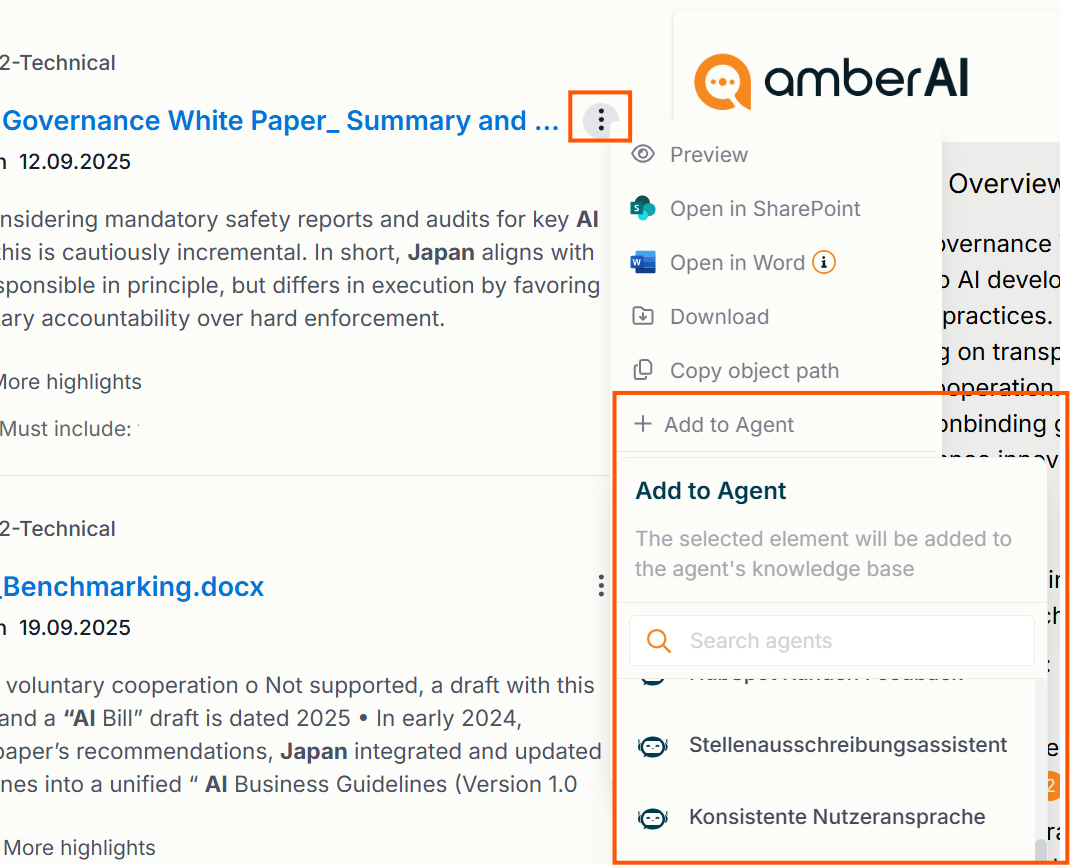
We are replacing the “Add to Bookmark” functionality with something similar, but mighty. You can now directly add search results to one or more agents. Click on the 3-Dot menu and select “Add to Agent” to see all agents you own and select the agent(s) you want to add the file to.
Once done, you will be able to see the files in the agent’s Knowledge Bases and can also delete them again from there.
🤖New Agent Functions
🤝Share Agents with People and Groups
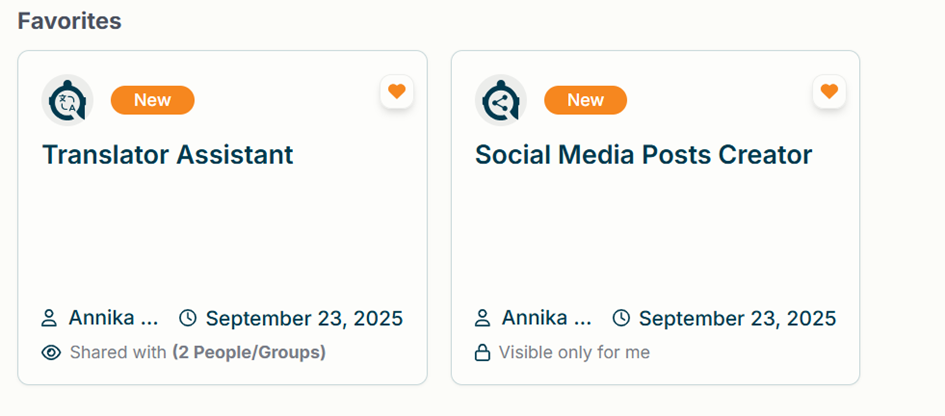
Until now, you could only share agents with everyone. From now on, you can also share an agent with specific people or groups.
To do so, go to the Visibility step in the agent configuration and select “Share with selected groups”.

A dialog will open where you can choose the people and/or groups.
Selected people and groups are marked with a green checkmark.
After saving, they will appear at the top of the list so you always have a quick overview of who the agent is shared with.

You can just as easily undo sharing:
Click the person or group again to remove them.
If you want to make the agent private again, choose “Visible only for me”.
👉 Note: Only the creator of an agent can change its visibility settings.
🎭Icons for Agents
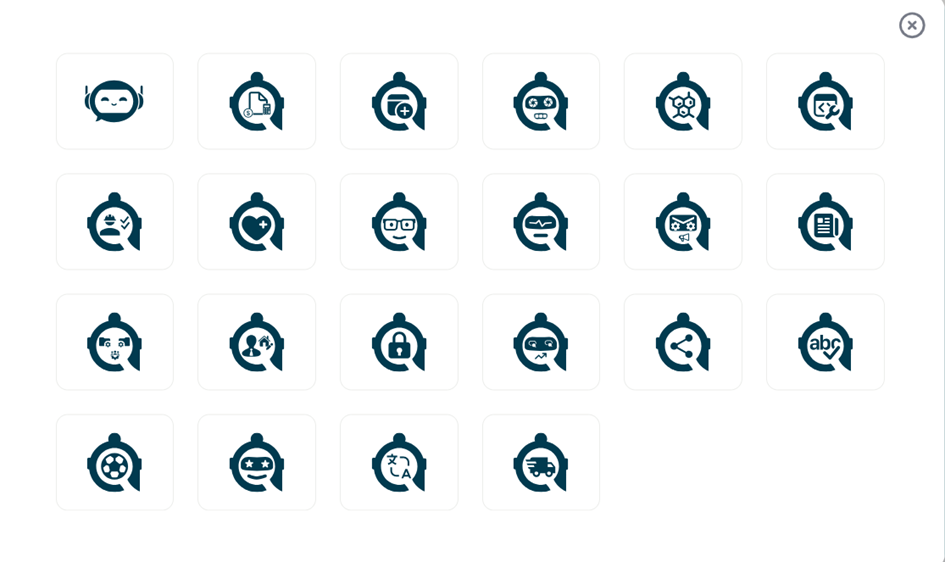
From now on, you can assign icons to your agents to make them more personal. Icons also help you find agents more easily.
To add an icon, go to the Name field in the agent configuration and click the + next to it. A selection of icons will appear.

Simply choose your favorite icon – it will then be shown next to the name and in the page header.
From here on, you are good to go - your new agent icon will be saved when you save the agent configuration and you can also change it anytime you want to.
📜New Chat Functions
🔍Search Chats
Wondering where that really important conversation ended up? No need for lengthy searching anymore! With the new “Search Chats” feature, you can search through your Agent and AI Dialogue chats and just pick up where you left.

👇Download a Chat
We are also introducing a small but neat function to simply download an entire chat. No more copy & pasting, a simple click is all you need.
To download a chat, navigate to the chat sidebar and click on the 3-Dot menu of the chat you like to download.

August 8th, 2025
New
Improved
🎨Labels for your agents
Label Overview
You now have even more options to organize your agents using labels.
This way, you’ll always keep track, even if you have lots of agents. You can also use labels as an extra filter: simply select the labels you want in the “Labels” filter.

All assigned labels are shown right on the agent card. Here, you can easily add or remove labels – just click the “Label” icon on the card. Any changes You make are visible to everyone, including for shared agents.

Label Management
To create a new label or edit or delete existing ones, just visit our new Label Management page under “Manage Labels.” Here, You can also search through all available labels and their descriptions. Creating a new label is super easy – just use the “Create Label” menu.


✨ Prompt Enhancer
Tired of staring at a blank screen or wrestling with awkward wording? Our automatic prompt enhancer gives your ideas a glow-up - instantly! Just type what you want, and watch as your prompt transforms into its best self. No magic wand required - just a little AI wizardry behind the scenes.
When composing the agent’s instructions, simply click on “Enhance Instructions” to instantly refine and elevate your text. You remain in complete control: choose to accept, discard, or further edit the enhanced instructions at any time.


📄Document Upload in Agents Chat and AI Dialogue
You can now use File Uploads while chatting with an Agent - just like in any AmberAI chat. Either click on the Attach icon to select a file, or simply drag it into the text box.

Additionally, you now also have the option to upload files in the AI Dialogue. Previously, this was only possible when in Company Knowledge mode. Now you can easily attach files - either click on the Attach icon or simply drag it into the text box.

📞Agents via Shortcut
Need to bring an agent into your chat on the fly? Nothing could be easier! Just type @ and pick your agent from the dropdown menu,almost like having agents on speed dial. The only difference? They won’t actually pick up the phone (yet).

🗺️More Languages
Ambersearch is now available in additional languages. Just go to "Settings" and expand the language menu. In addition to German and English, you can now also choose French, Italian, Spanish, Dutch, Polish, and Albanian.

🧠LLM Selector - Your Choice Made Easy
Our LLM Selector got an upgrade! You can now see more easily than ever which model is the right fit for you. Short descriptions will guide you to selecting the best model. To activate a specific model, please contact Customer Success.

July 18th, 2025
🚀New Features
🤖Agents
With Ambersearch, you can now create agents – making your daily tasks even easier and more efficient! Agents can take over recurring tasks for you without needing to input a prompt each time. You can find the agents in the left sidebar under "AI Agents."

For more information on what agents are and how to create them, check out our help article. Need a little inspiration? We’ve prepared something for that too – just take a look at our new Agents Library!
🌐 Web Search
Our AI Dialogue can do even more now! Activate "Web Search" to access real-time data from the internet and receive more comprehensive and better answers! The Web Search is available in the AI Dialogue and cannot be combined with Company Knowledge.

👆LLM Selector
It’s your choice! From now on, you can select between different large language models (LLMs) to be used for response generation.

Don’t see this option yet? Best to speak directly with your admin to get it activated.
🎨Design and User Experience
🖥️ Landing Page Redesign
The AmberAI page has been revamped to be even more intuitive and user-friendly. We’ve made improvements to the layout and navigation, allowing you to switch more quickly between Company Knowledge and AI Dialogue, as well as adjusting the layout of the chatbox.

⚡Quality Improvement & Speed
This time, we’ve also worked on various optimizations in the background. Ambersearch is now even faster – and our answers are better than ever!
🌍Extensions and Announcements
📚 Bookmarks Announcement
Sometimes, it’s time to say goodbye. The bookmark functionality will be deprecated in the next release (in about 2 months).
Our bookmarking feature is being revamped, as large parts of the function will now be even better utilized with our Agents. For example, you can simply upload documents you frequently access in bookmarks to an agent or connect a Knowledge Source there. But it’s not quite time yet – we will send out a separate detailed message about this.
🔗New Connectors
Our connectors have expanded! Ambersearch now supports:
Salesforce
Hubspot
Shares Inboxes for Exchange
🛠️Public Beta REST API
Our public REST API is now officially in beta! The API provides programmatic access to Ambersearch functionalities, allowing you to integrate search capabilities into your own programs. For more information, just go to developers.ambersearch.de and get started (page available in English only).
April 7th, 2025
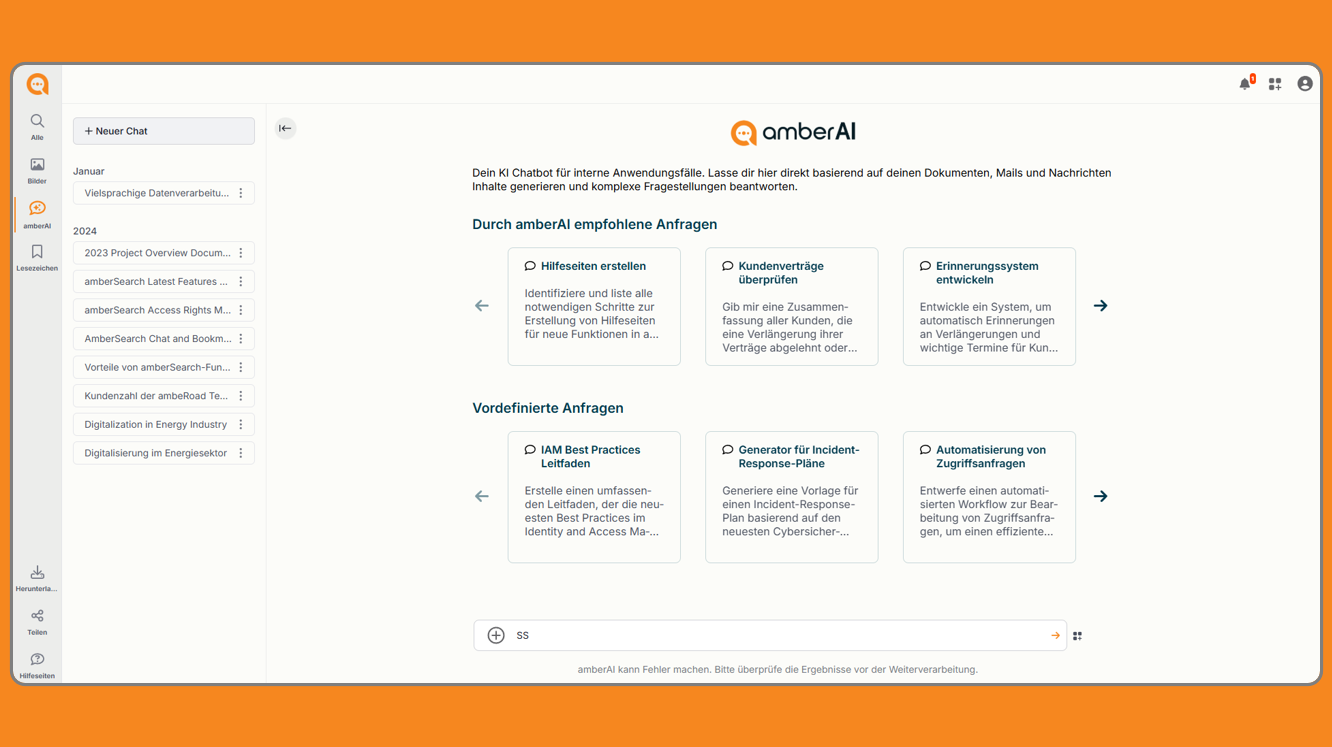
Wir haben das CI-Design von amberSearch überarbeitet, um es noch ansprechender zu gestalten. Dank optimierter Farben und einer schlichten, moderneren Gestaltung wird die Oberfläche noch benutzerfreundlicher.
Alle gewohnten Funktionen bleiben dabei unverändert.
Startseite

amberAI General Chat

March 31st, 2025
🖌️New look for amberSearch: More modern, more elegant, more intuitive!
We have revised the CI design of amberSearch to make it even more appealing. Thanks to optimized colors and a simple, modern design, the interface is even more user-friendly.
All familiar functions remain unchanged.
Homepage

amberAI General Chat

Help page

⬆️Upload function: Easy access to your documents
For more detailed information, click here to view the support page
With the latest update, you can upload files in the amberAI General Chat and receive precise answers to your questions about the content.
Click on the plus symbol to open the upload window. You can either upload a document by clicking on “Select files” or by clicking on the desired document, holding it down and dragging it into the upload area.


For more detailed information, click here to view the support page
✅Cross-device language setting
For more detailed information, click here to view the support page
Set once, applied everywhere!
From now on, you no longer have to specify your language settings for each of your devices - amberSearch remembers them.
Whether in the desktop app, in the browser or on your mobile device - your preferred language is retained everywhere.
Desktop: Smartphone:

For more detailed information, click here to view the support page